
We are pleased to announce that new filters have been added to the daily timesheets in Ameego! These new options are available when you click the ‘Print Timesheet’ button on the dashboard. See below for more details.
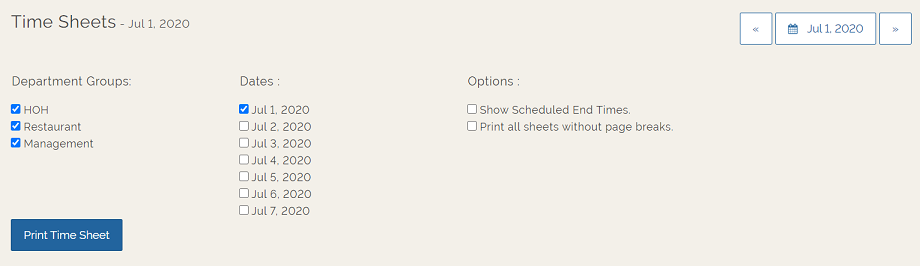
Department Groups selection
All of your department groups will be checked by default. You can uncheck any department group to remove it from the print job.
Date selection
This filter will display the current date (or the date selected using the calendar option) as well as the following 6 days. The current date (or date selected by the calendar option) will be the only date checked by default. Check more dates if required. This will allow you to print a full week of timesheets in one action.
Options
1. Show Scheduled End Times:
Check this box if you want to show the shift end times on the printed timesheet, but your global settings are set to NOT show end times.
2. Print all sheets without page breaks:
If multiple days are selected in the date section, we will print each day on a separate page. If you would like to remove these page breaks, then check this option before printing.
Comments
Please sign in to leave a comment.